How to play Bing Homepage Quiz and win?
Create a study schedule and stick to it. Allocate time for reading, writing, listening, speaking, and problem-solving exercises every day. #生活技巧# #英语学习#
Microsoft Bing and the Edge browser have small features that improve our browsing experience. Bing has introduced several features over the years, such as unique wallpapers, Bing Chat, and Bing Homepage Quiz. However, among all of these is Bing Homepage Quiz stands out as a unique feature that helps you test your knowledge.
So the question is, what is Bing Homepage Quiz? And can it be beneficial in any way? Let’s find out in this article.
What is Bing Homepage Quiz?
Bing Homepage Quiz is one of the oldest features introduced by Bing. It is also known as the Bing Daily Quiz and comes under the Bing search engine.
It offers a daily quiz on the Bing homepage asking users a trivia question or set of questions related to a wide range of subjects from around the globe, such as science, entertainment, history, sports, and more.
The quiz aims to engage users and test their knowledge while providing a fun and interactive experience.
There is no restriction about how to play the Bing homepage quiz. You can be a student, an employee of a company, or running a business. There is no one stopping you from testing your knowledge.
The quiz is also designed in a fun way that anyone with some general knowledge can answer it.
You can play Bing Homepage quiz using any browser you like. However, the quiz option might not be visible when you visit the Bing homepage.
First, you must close the Introducing the new Bing message. After that, you should see a Q icon; the questions will appear when you hover over it. In case you don’t see the Q icon, hover your mouse icon over the space under the search field, and you should be able to see it.
To play the Bing Homepage Quiz game, follow the below steps:
Hover over the Q icon, and you should see a question with multiple answers.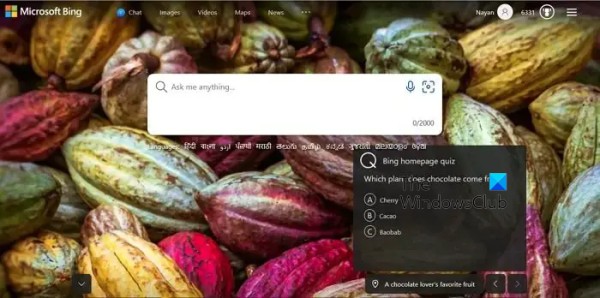
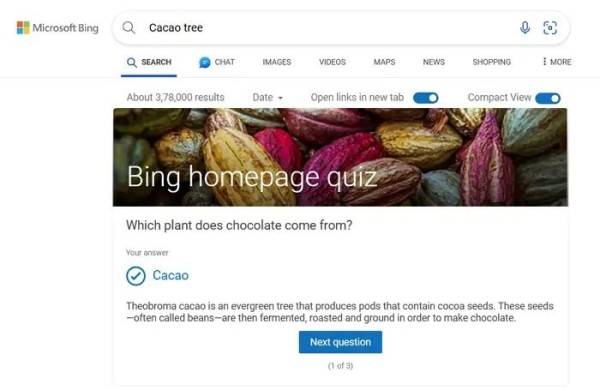
How to win Microsoft Rewards with Bing Quiz?
Microsoft Homepage quiz is something everyone must try out. It offers you rewards when you answer all three questions correctly. The rewards point can be later redeemed for exciting gift cards.
Apart from the Bing quizzes, you can also earn reward points in other ways, such as answering different questions and checking out different offerings by the Edge browser.
To learn more, visit Rewards.bing.com and sign in using your Microsoft account. Also, to earn maximum points, use the Microsoft Edge browser.
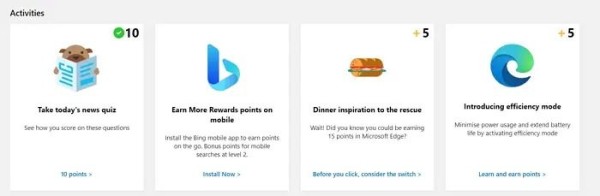
How do Microsoft Rewards work?
You earn Microsoft rewards points as you use Bing, answer its questions, and perform other activities. These points are stored in your Microsoft account, and you can use them to redeem different gift cards and other exciting prizes from the Microsoft store.
Read: How to use Microsoft Rewards and Give with Bing.
Bing HomePage Quiz not working
Sometimes, you may not find a Homepage quiz on the Bing search page. If this happens, you can first try closing the Introducing New Bing message and see if you can see the option. If that doesn’t work, follow these below methods:
1. Use a different BrowserIf you use Chrome, you can switch to other browsers like Microsoft Edge and vice versa and see if it works. You can also try visiting Bing.com using the incognito tab and see if that works for you.
2. Clear Cache & CookiesYou can also try clearing the cache and cookies to see if it resolves your issue. Cookies and caches often display a cached page that is not real-time. So clearing them will help you load a new version of the webpage. To do so, you can go to edge://settings/privacy from your Edge browser to clear cookies and cache.
Read: How to manage privacy in Microsoft Edge.
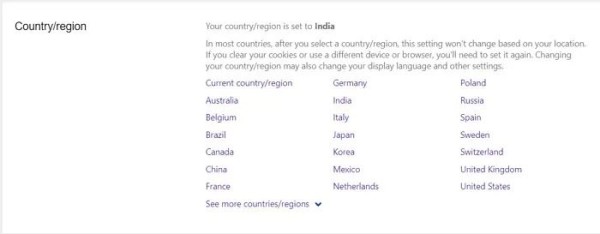
3. Change your regionFinally, you can try changing your region. To do so, follow these steps:
Open your browser and go to Bing.com. Click on the three-line icon from the top-right corner of the Bing homepage and select the Settings option.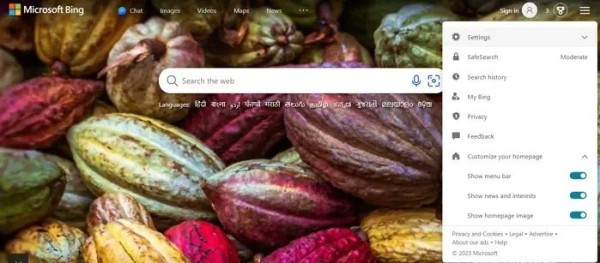
So that was all for the What is Bing homepage quiz. Now, try it out yourself and earn exciting rewards points that can later be redeemed for different gift cards and other digital content. If you are stuck at any step, feel free to comment below.
网址:How to play Bing Homepage Quiz and win? https://m.klqsh.com/news/view/202797
相关内容
How to Play Bing Homepage Quiz 2024How to Play Bing Homepage Quiz? [2025 Updated]
The Ultimate Guide to the Bing Homepage Quiz: How to Play, Earn Points
Bing Homepage Quiz Answers Today
A Deep Dive Into the Most Popular Bing Homepage Quiz Answers
Exploring the Most Popular Bing Homepage Quiz Questions of 2025
10 Bing Homepage Quiz Questions That Will Test Your Memory
MSPU Tips: Test Your Knowledge With Bing’s Weekly News Quiz
How To See All Bing Related Searches
Learn to use Bing search operators
随便看看
最新乐趣
- DIOR活动上的张元英真的是大明星啊
- 周生辰惹时宜生气 下秒一招哄好时宜,两人太甜啦
- 初看以为是荣善宝被拿捏,细品则是她拿捏全局
- 罗云熙官宣魅影神捕定档
- 林允儿又美又飒 美出高级感
- 安欣坚韧与安杰抱怨,右派帽子下压面条守体面
- 当兵多年的男人难得回一次家,可未婚妻得知消息后,并没有着急上前迎接
- 品析杨紫在《国色芳华》里的演技:尽显中式美学风华
- 51岁林志玲杂志封面,身材面部紧致如初
- 她苦等一生,只换来一句亏欠:《闯关东》秀儿 人生最顶级的翻盘…
热点乐趣
- 89593
- 77849
- 64158
- 60149
- 39754
- 35543
- 32258
- 22663
- 22439
- 21394